
 EN
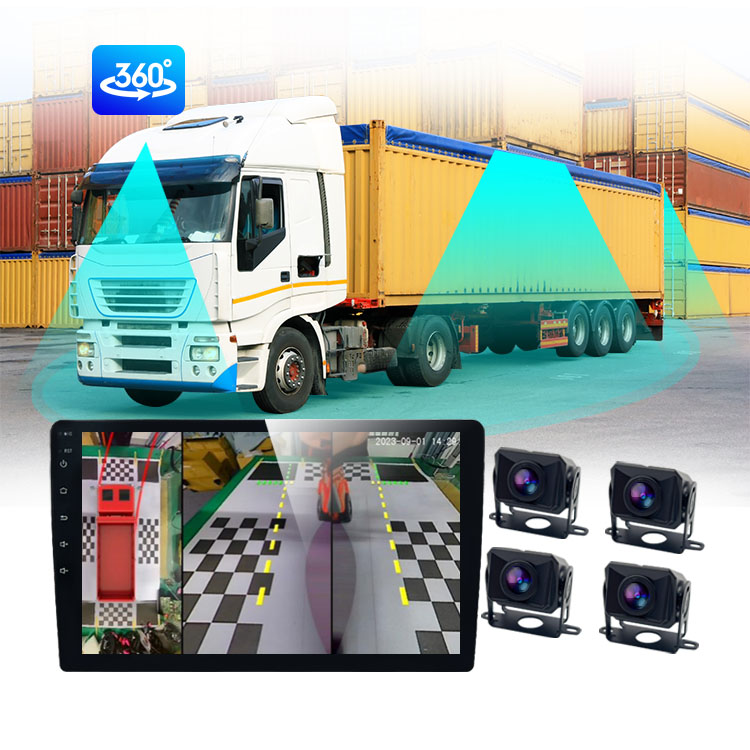
A truck monitor is an essential tool for modern fleet operations, providing real-time visibility into vehicle performance, driver behavior, and road safety. Whether you manage a single commercial vehicle or an entire fleet, implementing a truck monitor system can significantly reduce operational costs, enhance driver accountability, and improve overall safety compliance. This guide walks you through the practical steps to successfully deploy and configure your truck monitor setup, ensuring maximum efficiency and ROI from day one.

Installing a truck monitor requires careful planning, proper hardware selection, and systematic integration with your existing fleet management infrastructure. The process involves hardware installation, software configuration, driver training, and ongoing performance monitoring. By following this structured approach, you can avoid common pitfalls, ensure seamless deployment, and establish a robust foundation for continuous fleet oversight and data-driven decision-making.
Planning Your Truck Monitor Deployment
Assessing Your Fleet Requirements
Before purchasing or deploying a truck monitor system, conduct a thorough needs assessment of your fleet operations. Identify the specific objectives you want to achieve, such as reducing fuel consumption, lowering insurance premiums, improving route efficiency, or enhancing driver safety. Different truck monitor solutions offer varying features and capabilities, so understanding your priorities ensures you select the right equipment. Document your current pain points, such as excessive idling, harsh braking incidents, or poor fuel economy, to measure the effectiveness of your truck monitor implementation later.
Evaluate your fleet size, vehicle types, operational geography, and budget constraints. Larger fleets may benefit from enterprise-grade truck monitor systems with advanced analytics and multi-vehicle coordination, while smaller operations might prioritize simplicity and cost-effectiveness. Consider whether your truck monitor needs to integrate with existing telematics platforms, GPS systems, or back-office management software. This foundational planning phase ensures your truck monitor investment aligns with long-term business objectives and operational workflows.
Selecting the Right Truck Monitor Hardware
Choosing appropriate hardware is critical to the success of your truck monitor system. Look for devices that offer high-resolution display quality, reliable connectivity, and durability under demanding fleet conditions. A quality truck monitor should support multiple input channels, including front and rear camera feeds, GPS data, and vehicle diagnostics. Ensure the truck monitor features weatherproof construction, wide operating temperature ranges, and robust mounting systems suitable for commercial vehicles.
Verify that your selected truck monitor is compatible with your vehicle fleet and existing infrastructure. Check certifications, compliance standards, and technical specifications before procurement. Consider units that offer truck monitor systems with touch-screen interfaces, multiple camera support, and AI-driven safety features. Request product trials or demonstrations to validate that the truck monitor meets your operational requirements before making large-scale commitments.
Installation and Hardware Setup
Preparing Your Vehicles for Truck Monitor Installation
Proper vehicle preparation ensures a smooth and professional truck monitor installation process. Begin by selecting installation locations for the truck monitor display, cameras, and associated wiring. The main truck monitor display should be positioned within clear sight of the driver without obstructing windshield visibility. Identify secure cable routing paths that protect wiring from environmental exposure, vehicle vibration, and accidental damage throughout your truck monitor setup.
Conduct a comprehensive inspection of each vehicle's electrical system before installing your truck monitor equipment. Verify that power supply capacity is sufficient to support the truck monitor display and camera modules simultaneously. Ensure all existing vehicle systems, lights, and controls operate correctly, as the truck monitor installation may temporarily interrupt electrical connections. Create detailed installation documentation specific to each vehicle type in your fleet to maintain consistency and simplify future troubleshooting of your truck monitor systems.
Mounting and Connecting Your Truck Monitor System
Install the truck monitor display using weatherproof mounting brackets that secure the device firmly to the dashboard or windshield. Avoid positions that obstruct driver visibility or interfere with airbag deployment zones. Connect the truck monitor to the vehicle's main power supply using appropriately rated fuses and wiring, ensuring all connections are insulated and protected from moisture and vibration. Route camera cables carefully through the vehicle frame, securing them at regular intervals to prevent tangling or accidental disconnection from your truck monitor system.
Install front and rear cameras according to manufacturer specifications, positioning them to capture optimal field-of-view coverage for your truck monitor system. Front cameras should clearly capture road conditions, traffic signals, and lane markings, while rear cameras monitor trailing traffic and reversing operations. Connect all camera feeds to the truck monitor controller unit, verifying that video signals transmit clearly without artifacts or signal loss. Test all connections multiple times before finalizing the truck monitor installation to catch loose wires or configuration errors early.
Configuration, Testing, and Deployment
Configuring Truck Monitor Software and Settings
Access the truck monitor administration interface to configure core settings and operational parameters. Set up user accounts, assign driver login credentials, and establish permission levels within your truck monitor system. Configure GPS positioning, time synchronization, and data logging intervals to match your fleet management requirements. Calibrate the truck monitor display brightness, contrast, and video resolution to ensure optimal visibility under various lighting conditions and weather scenarios.
Program alert thresholds and safety parameters specific to your fleet operations within the truck monitor system. Define thresholds for harsh braking events, excessive idling, speeding, and collision detection that trigger notifications and data recording. Customize which truck monitor alerts appear in real-time, which are logged for later review, and which trigger automatic notifications to drivers or fleet managers. Test the truck monitor configuration thoroughly in a controlled environment to verify that all features function as intended before deploying the system across your fleet.
Testing and Validating the Truck Monitor System
Conduct comprehensive testing of your truck monitor system before full-scale fleet deployment. Perform road tests on various vehicle types to verify that the truck monitor display functions reliably during normal operations, braking, acceleration, and turning. Test video recording quality, audio capture, and real-time data transmission from the truck monitor in different weather conditions and locations. Verify that the truck monitor accurately logs vehicle diagnostics, GPS coordinates, and event data for historical review and analysis.
Validate communication between the truck monitor hardware and your back-office management platform. Confirm that real-time alerts transmit correctly to intended recipients and that historical data is accessible through your truck monitor dashboards. Test driver interfaces to ensure that on-screen guidance, navigation assistance, and alert messages are clear and non-intrusive. Resolve any technical issues, compatibility concerns, or performance anomalies identified during testing before rolling out the truck monitor system to your entire operational fleet.
Driver Training and Operational Launch
Implement comprehensive driver training programs to ensure all operators understand how to use your truck monitor system effectively. Demonstrate the truck monitor interface, explain real-time alert meanings, and instruct drivers on proper camera positioning and maintenance. Address driver concerns about privacy and monitoring, emphasizing that the truck monitor protects both driver safety and company liability. Provide clear guidelines on how drivers should respond to various truck monitor alerts and when to seek assistance from fleet management.
Launch your truck monitor deployment in phases, beginning with a pilot fleet before full rollout. Monitor initial performance metrics, collect driver feedback, and identify any operational challenges with your truck monitor system. Adjust settings, alert thresholds, and driver protocols based on real-world performance data. Establish ongoing support processes, maintenance schedules, and firmware update procedures to keep your truck monitor system running reliably throughout its operational lifespan.
FAQ
How long does it take to install a truck monitor system?
Installation time for a truck monitor system typically ranges from two to four hours per vehicle, depending on the complexity of the setup and the condition of existing electrical systems. Hardware installation, wiring, camera mounting, and initial configuration require a skilled technician to ensure proper functioning of the truck monitor. For large fleet deployments, organizations often schedule phased installations to minimize operational disruption and ensure quality workmanship across all truck monitor installations.
Can a truck monitor system work with existing GPS and telematics equipment?
Most modern truck monitor systems are designed to integrate seamlessly with existing GPS trackers, telematics platforms, and fleet management software. Before purchasing, verify compatibility between your truck monitor and current systems to avoid costly integration challenges. Many truck monitor solutions support standard data formats and APIs that enable data sharing with third-party applications, creating a unified fleet monitoring ecosystem rather than isolated truck monitor data silos.
What maintenance does a truck monitor system require?
Regular maintenance of your truck monitor keeps the system functioning reliably and extends its lifespan. Clean camera lenses and display screens monthly to maintain video quality, inspect wiring for corrosion or damage, and verify all physical connections remain secure. Update truck monitor firmware regularly to access new features and security patches, and monitor storage capacity to ensure your truck monitor continues recording without data loss interruptions.